


GoodRx: Prescription Coupons review
 Analysis by GetAllApps
Prescription costs can be difficult to plan around, especially when several people in a household need medication. GoodRx is a free medical app built around helping people find affordable prescription medications for themselves and their families. Its purpose is easy to grasp, and that simplicity matters: when someone is worried about a medicine’s cost, an app should make the next step feel more manageable rather than add another layer of confusion.
I find the app’s most useful promise is also its clearest one: it focuses on medication affordability. That gives people a practical reason to open it, whether they are checking options for themselves or helping a family member. The experience is best understood as a tool to support prescription shopping, not as a substitute for a clinician or pharmacist. Keeping that distinction in mind helps set realistic expectations from the start.
A straightforward starting point for prescription savings
GoodRx has been available since December 2012, and its continued popularity suggests that the problem it addresses is a familiar one. It has a 4.8 average rating from around 336,000 ratings, with more than 10 million installs. Those figures point to a well-established app, though they do not tell every individual user what their own medication options will be. The practical value depends on whether it helps with the prescription and circumstances in front of you.
The app is free, has an Everyone age rating, and is developed by GoodRx. Its current version is 9.22.0, and it supports devices running Android 8.0 or later. These details make it approachable for a broad range of users, including people who may be helping relatives manage healthcare tasks. Still, a compatible phone is only one part of access; confidence, vision, dexterity, connectivity, and familiarity with apps can all affect how comfortable the experience feels.
When I assess a health-related app, I look for a clear purpose and a low-friction path to useful information. GoodRx has a strong advantage here: its central aim is not buried beneath a complicated pitch. It is about finding affordable prescription medications. That focus can help users decide quickly whether the app is relevant to what they need today.
Readability and navigation in a high-stakes moment
Medication decisions can feel stressful, and people may open a savings app while juggling a doctor’s instructions, a pharmacy conversation, or a family member’s needs. In that setting, plain language and a coherent flow are more than cosmetic qualities. They help users understand what the app is for and keep the task from feeling larger than it already is. GoodRx’s concise purpose gives it a sensible foundation for that kind of use.
At the same time, an app’s name and summary cannot tell us everything about the day-to-day interface. I would avoid assuming that every screen is equally simple or that every user will find it effortless. A person who regularly shops and compares information on a phone may move through a medical app confidently, while someone who rarely uses apps may need more time to get comfortable. That difference is normal, and it is worth accounting for when deciding how to use GoodRx.
For a first visit, I recommend approaching the app with one clear task in mind. Keeping the prescription or question you want to investigate in front of you can make the process feel more focused. If you are helping someone else, it can also help to agree together on what you are trying to learn, rather than treating the app as a source of medical advice. That small bit of preparation supports clearer, more confident use.
Clear expectations are part of accessibility. GoodRx is centered on prescription affordability, so users can approach it as a way to explore medication-cost options. It should not be treated as a diagnosis tool or as a replacement for professional guidance. If an app’s information raises questions about a prescription, I would bring those questions to a pharmacist or healthcare professional before making a change.
Different abilities, different ways of using a phone
People do not all interact with a screen in the same way. Some rely on larger text, stronger contrast, magnification, or spoken feedback. Others may have limited hand movement, tremors, or difficulty with repeated tapping. A useful review should take those realities seriously without claiming that an app has specific accessibility features unless they are confirmed. I can say that GoodRx addresses a practical healthcare need; I cannot assume that every interaction will suit every ability.
For users with visual needs, device-level display settings may make general phone use more comfortable, but the result can vary from screen to screen. Enlarged text can sometimes make content easier to read while also changing how much fits at once. People who use screen-reading tools may want to test the app with their usual setup and see whether the information is understandable in the order it is presented. These are sensible checks for any app used during a healthcare task.
Motor access deserves similar attention. A person who finds precise taps tiring may prefer to take their time, work in a calm setting, or ask a trusted helper to assist with navigation. That does not mean they have to hand over decisions: support can simply mean having another person nearby while the user remains in control. For family caregivers, this can be a practical way to help someone compare prescription-cost information while respecting their preferences.
Sensory context also affects usability. Bright light, noisy surroundings, fatigue, or stress can make reading and concentration harder. If the task is not urgent, using the app somewhere comfortable and giving yourself time may lead to a better experience. If you are comparing medication options during a busy pharmacy visit, it may be useful to pause and read carefully rather than rush through details that matter.
Useful in everyday situations, with the right support
GoodRx may fit several ordinary situations: checking medication affordability before a pharmacy trip, helping a relative understand options, or keeping a prescription-cost question organized for a conversation with a professional. Its family-oriented purpose is relevant for people who coordinate care across a household. Rather than relying on memory alone, users can make the app part of a broader routine for preparing questions and discussing costs.
That routine should remain flexible. Someone may be comfortable exploring the app independently at home but prefer assistance when tired or under pressure. Another person may want to handle the phone themselves while asking a family member to read along. Inclusive access is not one fixed workflow; it means allowing people to choose the amount and kind of support that works for them.
Device compatibility also shapes who can use the app. GoodRx requires Android 8.0 or later, so people with older or unsupported devices may not be able to install the current version on that phone. The app is also available in a mobile environment where battery life, screen condition, and internet availability can affect whether it is convenient at a particular moment. These are common realities of mobile healthcare tools, not reasons to dismiss the app, but they do matter when planning around an important prescription.
For users who prefer not to manage a healthcare task alone, involving a trusted person can make the experience more approachable. A family member might help navigate the app, while the person taking the medication stays involved in decisions and confirms details with a pharmacist or clinician. I think that balance is especially important: assistance should make information easier to reach, not make the user feel sidelined.
Where the experience may still feel challenging
No single app can remove every barrier associated with prescription costs. The ability to find affordable medication options does not by itself resolve questions about whether a medicine is clinically appropriate, how it interacts with other treatment, or what a person should do if a prescription changes. Those decisions belong in a conversation with qualified healthcare professionals. GoodRx is most useful when it supports that conversation rather than replacing it.
There can also be a gap between finding information and acting on it. Users may need to understand the details, communicate them clearly, and decide what to ask next. Someone who is not comfortable reading healthcare terms or comparing costs may benefit from discussing what they find with a pharmacist or trusted caregiver. Taking a screenshot or writing down a question may help some people, but the important point is to verify anything that could affect treatment with a professional.
Another barrier is the assumption that everyone has equal access to a modern smartphone and a dependable connection. A free app removes the purchase price of the software, but it does not remove the cost of a device or the practical challenges of using one. People who share a phone, have limited data access, or prefer in-person help may find that a mobile-first approach is not always the most convenient route. Keeping other ways to ask about medication costs in mind can prevent the app from becoming the only option.
Finally, a strong public rating is reassuring as a sign of broad interest, but it should not be confused with a guarantee that the app will work equally well for every person or prescription. Individual needs differ. I would judge GoodRx by whether it helps a user take a clear next step, not by popularity alone. For medical decisions, the safest next step may still be confirming the information with a pharmacist or prescriber.
An inclusive verdict for people managing medication costs
GoodRx is a focused, free medical app for people looking to find affordable prescription medications for themselves and their families. I like that its central purpose is easy to understand and relevant to a real everyday concern. Its popularity and long presence in the app market make it a familiar option, while its broad age rating reinforces its potential usefulness across households.
Its accessibility story is best approached with practical care rather than assumptions. People with different visual, motor, sensory, and digital needs may experience the same task differently. Taking time to test the app with personal device settings, using support when desired, and checking important details with a healthcare professional can make the experience more comfortable and responsible. Those steps are especially useful when the user is tired, stressed, or assisting someone else.
My overall view is that GoodRx can be a helpful starting point for exploring prescription affordability, particularly for people who want to prepare for a pharmacy or family-care conversation. It does not need to be the whole solution to be worthwhile. If you want a mobile tool with a clear medication-cost focus, it is worth considering; just use it as support for informed discussions, not as a replacement for professional medical guidance.
Pros and cons
Pros
- Free to use with no subscription required.
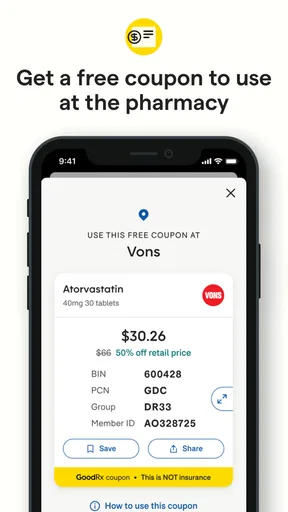
- Coupons can be shown at participating pharmacies before checkout.
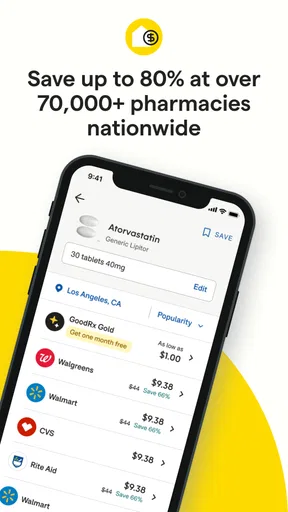
- Price comparisons help users look for lower-cost alternatives.
- Medication reminders can support consistent routines.
- The app can store prescription information for easier reference.
Cons
- Coupon prices may vary by pharmacy and location.
- Not every medication or pharmacy is covered by a coupon.
- Coupons generally cannot be combined with insurance for the same purchase.
- Some features require sharing personal health or location information.
- Savings shown in the app are not guaranteed until the pharmacy confirms the price.


